Harness: the word of 2026 (and how Codex works under the hood)
Published on
If you’ve ever used Codex, Cursor, Claude Code, GitHub Copilot, Gemini CLI, or any of these new AI tools that help you program, you’ve probably noticed there are things the model does on the website or in the app, but that Codex or Claude Code do way better or in a pretty different way.
ChatGPT gives you the code as text in its reply. Codex opens the file, edits it, saves it, runs the test, sees that it failed, edits again. But wait, aren’t both of them using the same model (GPT-5.5, for example)? What’s going on?!
Well, if you keep an eye on the AI world, you’ve already figured out that what’s doing all of this isn’t the AI model in the sense we talk about it on Xwitter. It’s a guy living around it, called the harness, and it has become “the word of 2026”.
If nobody has explained what that is to you yet, this post is for you.
I’ll use Codex as the example, OpenAI’s programming harness/agent, because its code is fully open source, so I could literally just download the code and go through how it works on the inside.
Shall we?
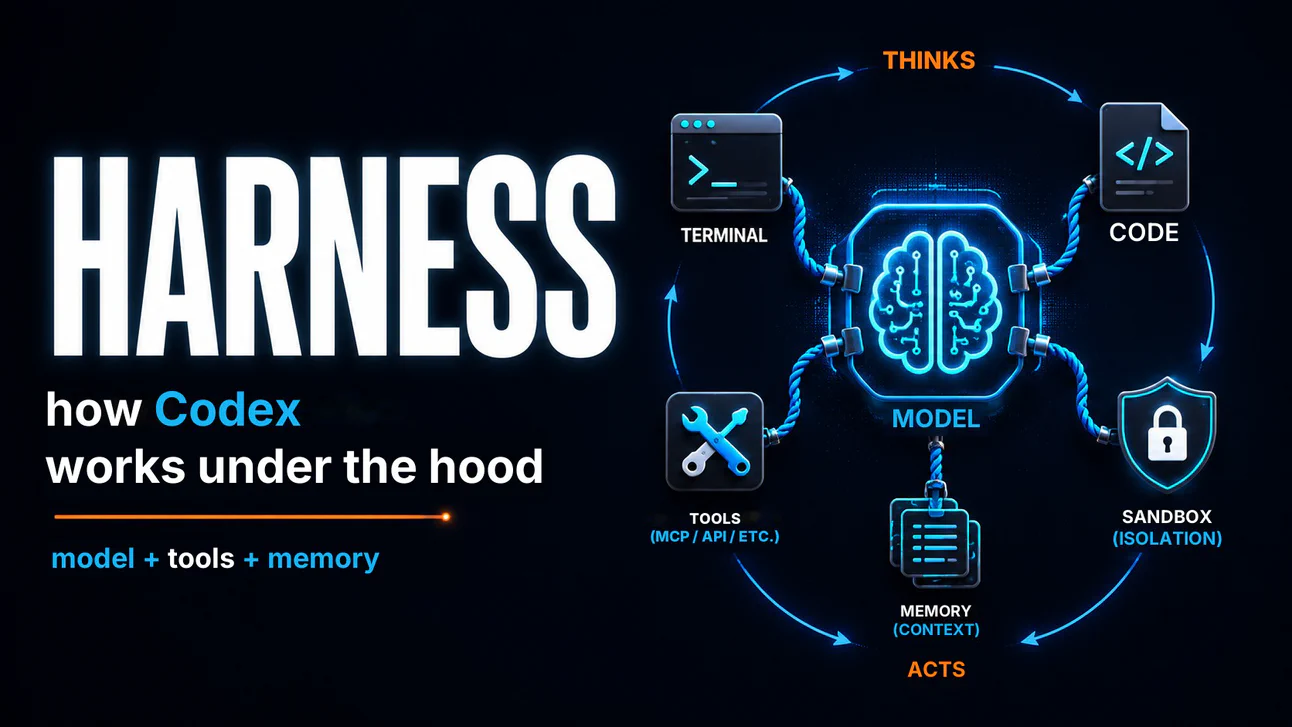
The difference between “model” and “agent”
Let me start by separating two things we tend to lump together.
A language model (an LLM, like GPT-5.5 or Claude Opus 4.7) is, by analogy, a function. You send in text, it does some math and gives you text back. That’s it. It doesn’t run commands, it doesn’t open files, it has no memory of what you talked about yesterday, and it doesn’t access the internet on its own.
If you send “list the files in my Documents folder”, the model gives you a plausible answer based on its training on millions of folder listings it has seen, but it won’t actually list what’s in your folder, because it has no access to it.
An agent is different. We usually say it’s made up of (at least) three things:
- Brain: the LLM that will think and plan the next steps.
- Hands: the tools that give the model access to the internet, to your computer, to the weather API, etc.
- Memory: it can be short-term (remembers your conversation) or longer-term (we don’t have anything great for that yet, and it’s been done with Markdown files saved on the machine).
When you ask Codex or Claude Code to “fix that bug”, it can open the folder where the code lives, read your spaghetti code, find the error, edit the file, save, run the test, check whether it passed, redo it if needed, etc etc etc.
That’s a bunch of real actions, chained together, without you having to click on anything in between. And it can do that because it has this harness around it.
The word “harness” in English means something like reins or tack (for a horse), and it’s what controls your brain (the LLM) like a rebellious stallion, and makes it solve the problem you actually want it to solve.
So in this case, the harness is pretty much a mix of the agent’s hands and memory, everything that sits around the brain, which is our LLM. And then all of that together, with the brain, would be the “agent”.
The seven things a harness needs to do
Every time you ask Claude Code or Codex for something, this harness needs to, more or less:
Receive your message and build the context for the model: that includes taking what you typed, combining it with system instructions, attaching some relevant history from that session, and packaging it all in a format the model’s API understands. A ton of decisions already live here: how much history to send, in what order, what to cut when the context gets too big, etc.
Receive the model’s response as a stream: the model doesn’t spit out the answer all at once; it sends it word by word. The harness has to deal with that and identify different kinds of responses (plain text for the user vs a request to run a tool).
Identify when the model wants to perform an action: often, the model’s response isn’t text for you, but a request to the harness itself, like “run this command”, “read this file”, “apply this diff”. The harness needs to recognize that request and parse the arguments correctly.
Actually perform the action, safely: running arbitrary commands in the user’s terminal is dangerous, so that execution has to go through a sandbox and, depending on the case, through explicit user approval.
Take the result and send it back to the model: the result might be a command’s output, the content of a file, an error message, whatever. All of it becomes input for the model’s next round of reasoning.
Repeat the cycle X times until the model says “done”: each action can trigger one or several additional rounds. The harness keeps the loop running, carefully avoiding an infinite loop (and without letting everything freeze when you tell it to stop midway).
Persist everything so you can resume later: the session has to be saved somewhere so you can close the terminal today and pick up tomorrow from the same point, or revisit what happened in an old session.
Each of these steps looks simple, but it isn’t. And the catch is that what makes an agent good isn’t just the model, it’s the harness around it.
You can have the best coding model in the world, but if its harness is bad (if it freezes, if it doesn’t cancel when you tell it to stop, if it accidentally wipes your git repository, if it forgets the conversation when you close the terminal), you’re going to be pissed.
By the same token, a model that isn’t all that exceptional but has an excellent harness can work better than the one I mentioned above.
That’s why Anthropic and OpenAI are investing so much in these harnesses, and why this has already become the word of 2026 (just like “agents” was the word of 2025).
The loop: how the agent alternates between “thinking” and “acting”
Like I said, Codex’s harness code is open source and out there on GitHub. I downloaded it to take a look under the hood. Simplifying a lot, a typical session works like this:
You type something like “add a function to file ‘such-and-such’ that returns the list of the last 10 orders made in the store”. Codex takes that and sends it to the model along with system instructions and the project context. The model doesn’t answer with finished code. Instead, it answers with something like: “first I need to read the routes.ts file to understand the structure”. That answer is what’s called a tool call: the model is asking the harness to run a tool (in this case, the tool that can read a file).
The harness receives that request, uses the tool that actually reads the file, and sends the content back to the model, which will serve as the context for what we’re talking about. The model sees that content and thinks: “ok, now I’ll open the orders file to see the schema”, which is yet another tool call. The harness runs it. The result comes back. The model finally says: “now I’ll apply this diff here”. The harness calls another tool and applies the diff (asking for your approval first, if you configured it to ask), then calls the tool that saves the file, then calls the tool that runs the tests. Let’s say the tests fail. In that case, the harness tells the model, the model identifies the error and sends back text with the fix, and the harness again calls the tool that applies a new diff. This time, the tests pass. The model says: “done”. Loop finished.
This back-and-forth between “the model thinks up the next step” and “the harness executes the step” is what sets a harness apart from the chat agents we were used to until recently. Each of these round trips is a call to the model’s API, with everything that has happened so far in the context.
One important detail: each of these round trips costs money. Every call to the model’s API is billed per token (both what you send and what the model answers, and the history goes along on every call). On a simple task, that’ll be dozens of calls. On a complex session, hundreds.
If you use it directly via API, it goes on your credit card (and your wallet is going to be pretty sad at the end of the month). If you use it through a subscription (Cursor Pro, Claude Pro, ChatGPT Plus, etc.), the company absorbs the cost, but you get those 5-hour, daily, and weekly limits. When you hit them, you either have to pay extra or wait for the next cycle.
That’s why a stuck harness is the worst nightmare of the 2026 dev (along with those limits). If the agent gets into an infinite loop trying to fix the same thing a thousand different ways, it’s your credit card that cries.
Sandbox: how the agent doesn’t destroy your computer
Now a part I thought was really cool about Codex.
Think about it. It can run commands in your terminal. That’s absolute power, and it costs it nothing to run an rm -rf / and wipe your entire system. If the model, for whatever reason (hallucination, a badly formed instruction, prompt injection), decides to run a catastrophic command, what me, you, and the whole stadium crowd want is for the harness not to let it.
Codex’s solution for this is what we call a sandbox.
Think of it as a Docker container, but a tiny one, created just to run that specific command and then be thrown away. Inside the sandbox, the command thinks it’s running on your computer, but it can really only touch what you authorized for that specific use.
Codex has three configurable levels of restriction:
- Read-only: the agent can read any file, but can’t write anything. Really useful when you just want an analysis, like “explain what this code does”.
- Can write only in the project folder: the agent can edit files in the directory you’re in, but can’t touch
/etc,~/.ssh/, or anywhere outside your workspace. This is the default mode and it’s the one Codex runs in when you tell it to fix a bug. - No restrictions: YOLO mode, living dangerously, giving it full access. Use with care, and only when you’re sure of what you’re doing.
One detail is that Codex has three completely different sandbox implementations, one for each major operating system (macOS, Linux, Windows), all hidden behind a single interface.
The agent itself doesn’t know which system it’s running on. It just asks to run a command, and the harness figures out how to do that on whatever OS is there (and safely, of course).
MCP: the universal outlet for agent tools
Another important piece of the modern harness is how it connects to external services. You want the agent to read your issue in Linear, open a PR on GitHub, check a document in Notion, and look something up in your company’s internal API, but how is it going to do that?
Back in the day (in 2023, “back in the day” is two years ago at AI speed), each agent implemented integrations case by case with the services’ APIs. Cursor had its connector, Claude Code had its own, and everybody reinvented the wheel.
In 2024, Anthropic launched the MCP (Model Context Protocol). It’s an open standard that basically says: “any service can expose its functionality in a standard way, and any agent that understands MCP can use it”.
The analogy everyone has made since back then is a “universal outlet”. Like, before, every appliance came with a different plug, but now they all fit the same one.
Today you install a GitHub MCP server and any agent that knows how to “speak MCP” (Claude Code, Codex, Cursor, and others) can read your issues, create PRs, etc. You install a Notion MCP server, and your agents can read your documents. Another cool analogy is a “marketplace of tools”.
Talking about Codex specifically, it does something interesting. It’s both an MCP client and an MCP server. As a client, it consumes whatever MCP servers you configure (GitHub, Notion, whatever). As a server, it exposes Codex itself as a tool other agents can use.
That means that, in theory, you can run Claude Code and set Codex up as one of its tools. One agent calling another. A lot of people say this agentic polygamy is the future of software development.
Skills: the lightest way to teach the agent new tricks
There’s also a second way to extend what the agent knows how to do, and it’s important to tell it apart from MCP: skills.
A skill, in Codex (or Claude Code, Cursor, etc.), is basically a folder on your computer with a SKILL.md file (Markdown format) that describes to the agent how to do a specific task the right way, or the way you want it done (like “review a PR following the company checklist”, “run our custom lint”, etc.), along with helper scripts when needed.
Codex loads these skills automatically, and when what you ask matches what a skill covers, it invokes the skill as a tool.
It’s basically a file containing an excellent “step by step” guide that teaches the agent to do the ideal Prompt Engineering for that specific case.
We can think of it like this: if your team has ten different ways of reviewing PRs and you want to standardize, use a skill. If your company requires every production change to go through a specific checklist, use a skill. If you want the agent to follow a house convention every time it generates a database migration, use a skill.
The MCP + skills combination is what can make an agent really become a member of the team, and not a generic assistant. MCP plugs it into your tools, and skills teach it to work the way you like or need.
Memory: the agent that remembers (and what it forgets)
One more piece you can observe in Codex.
Every conversation you have with it is saved in a file on your disk. You can run the codex resume command and it picks up from where you left off yesterday. You can also fork a session, like “ah, I wish I’d made a different decision back in the middle, let me go back to that point and take another direction”, kind of like creating a branch on GitHub, but for your conversations with these agents.
They also have the long-term memory I mentioned earlier. The idea is that things you said or that happened in a session (preferences, important decisions, lessons learned) get distilled and stay available for the next sessions.
Codex implements this in two stages: first it extracts memory candidates session by session; then, periodically, a dedicated agent (yes, a sub-agent running inside the harness) consolidates everything into a persistent memory document.
Like I said, this long-term memory part is an Achilles’ heel of any agent or harness these days, and it’s where we’ll probably see a lot of new stuff in the coming months.
And that’s basically what’s in its code!
Next time someone tells you “this new AI tool uses model X, so it’s good”, you’ll know that’s half the story. Maybe not even that.
The other half is in the harness.
And now you know where to look.