Tutorial: Extracting Data from Customer Documents with Mistral OCR in Python
Published on
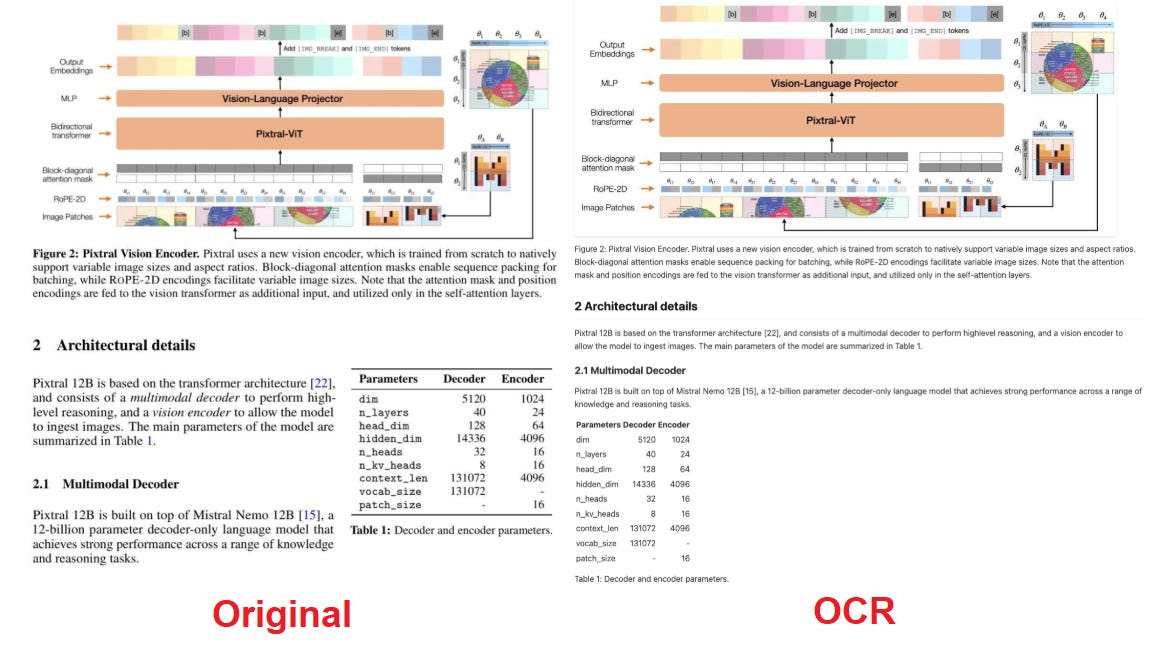
Mistral AI recently launched Mistral OCR, a new AI-based optical character recognition (OCR) tool designed to extract text and structured data from documents with high accuracy. Unlike traditional OCRs, Mistral OCR is multimodal and natively multilingual, able to recognize text in thousands of languages and alphabets (including scripts like Hindi, Arabic, and Chinese) and even read handwritten text in images or PDFs. On top of that, it preserves the document’s formatting and hierarchy, returning the extracted content in a structured format (like Markdown or JSON) that makes post-processing easier for developers.
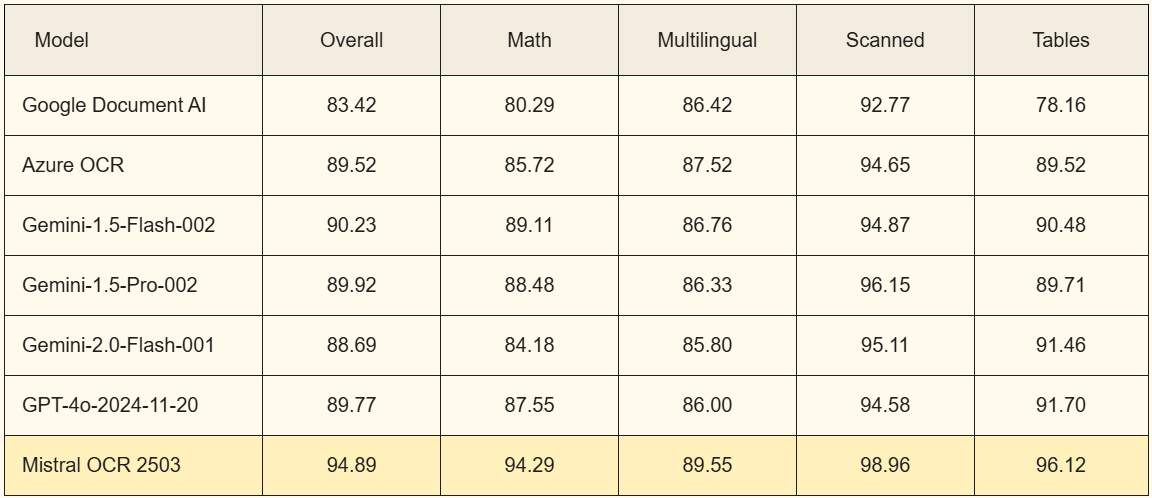
Mistral OCR compared to its competitors
In this tutorial article, I’ll explore how to use Mistral OCR to extract data from customer documents, covering:
- Recognizing fields and text in customer invoices and receipts: how to extract the essential information from financial documents in different formats.
- Handwritten text recognition: how to process and digitize handwritten content effectively.
- Support for multiple languages: how to set up and use the OCR with documents in a variety of languages.
- Privacy and masking of personally identifiable information (PII): best practices for anonymizing sensitive data before sending it to a language model (LLM).
The goal is to provide a clear, practical guide, with Python code examples, to help developers integrate Mistral OCR into their document automation projects.
1. Recognizing fields in customer invoices and receipts
Financial documents, like invoices, receipts, and tax invoices, usually contain key fields (for example: invoice number, issue date, total, customer details, and line item details). Extracting those fields by hand is time-consuming and error-prone, and that’s where Mistral OCR can help by automating the reading of these documents.
Structured text extraction: Mistral OCR doesn’t just recognize the text, it also keeps the original structure and formatting, identifying headers, paragraphs, tables, and lists. That means item tables or totals sections in an invoice will show up in the output in an organized way, instead of a messy wall of text. Preserving the hierarchy makes it easier to pull out specific information, because the labeled fields (like “Invoice No.”, “Date”, “Total”) show up right next to their values in the returned text.
Python usage example: To process an invoice with Mistral OCR, we can use the Python SDK provided (mistralai). In the code below, we use a sample PDF accessible by URL (it could also be a local path converted to base64) and extract its content:
import os
from mistralai import Mistral

api_key = os.environ["MISTRAL_API_KEY"]  # paste your Mistral API key here

client = Mistral(api_key=api_key)

# URL of a PDF invoice (public example)
document_url = "https://www.wmaccess.com/downloads/sample-invoice.pdf"

ocr_response = client.ocr.process(
    model="mistral-ocr-latest",
    document={"type": "document_url", "document_url": document_url}
)

# Extracting the Markdown text from the first page
page_text = ocr_response.pages[0].markdown

print(page_text[:500])  # prints the start of the extracted text so we can see the fields
In the code above, “client.ocr.process” sends the document to the mistral-ocr-latest OCR model and returns the structured response. We use “document={“type”: “document_url”, …}” to indicate that we’re providing a direct URL to the PDF file. Alternatively, we could read a local file and send it as base64 (I’ll show that in the next section).
The response (ocr_response) contains a list of pages (ocr_response.pages), where each page has the extracted text in Markdown format in the markdown property, possibly including headers, tables, and formatting similar to the original document.
After getting the page’s OCR text, we can then look for the fields we want. For example, to find the invoice number and the total, we could use simple methods like keyword search or regular expressions on the text:
import re

# Assuming page_text contains something like "Invoice No: 12345" and "Total: $ 987.65"
invoice_no_match = re.search(r'Invoice No[:\s]+(\S+)', page_text)
total_match = re.search(r'Total[:\s]+([\d\.,]+)', page_text)

invoice_no = invoice_no_match.group(1) if invoice_no_match else None
total_value = total_match.group(1) if total_match else None

print("Invoice number:", invoice_no)
print("Total amount:", total_value)
In the case above, I used a regex to capture the sequence of digits after “Invoice No” and the numeric value after “Total”. In real documents, you may need to adjust the patterns (considering variations like “Invoice #”, “Amount Due”, different languages, etc.). Since Mistral OCR keeps labels and values close together in the extracted text, this direct approach usually works for known structured documents. For scenarios with lots of different formats, a robust alternative is to use an LLM to interpret the OCR content.
For example, we could pass the OCR text to a language model (including one from Mistral itself) with an instruction like: “Extract fields X, Y, Z from this text and return them as JSON”. Mistral OCR is integrated with the language models for Document Understanding, letting you ask natural language questions about the document or get structured outputs automatically. That integration goes beyond the scope of this tutorial, but it’s something to consider for advanced applications (the official documentation has examples of using Mistral models to turn the OCR output into structured JSON automatically).
Tip: Always visually check a sample of the extracted text (like I did with print(page_text[:500])) to understand how the fields show up. That helps you adjust your parsing or validation. In short, to extract fields from invoices: first get the text via Mistral OCR, then locate and structure the relevant data according to your needs.
2. Handwritten text recognition
One of Mistral OCR’s strengths is its ability to handle handwritten text, something historically challenging for OCRs. Whether it’s a form filled out by hand, a signed contract, or a handwritten note, we can try to extract that content automatically. Mistral’s model was trained to recognize handwritten notes and other complex elements. It’s worth noting, though, that accuracy when reading handwriting can vary depending on the writing and the image quality. Well-scanned, legible text (for example, block letters or print) will give better results than very ornate cursive.
Example with a handwritten image: Suppose we have a photo or scan of a handwritten note (for example, a customer form filled out by hand). We can use Mistral OCR like this:
from mistralai import Mistral
import base64

client = Mistral(api_key=os.environ["MISTRAL_API_KEY"])

image_path = "handwritten_note.jpg"  # path to the local image

# Reading the image file and converting it to base64
with open(image_path, "rb") as img_file:
    base64_data = base64.b64encode(img_file.read()).decode('utf-8')

# Building the base64 data URI
data_uri = f"data:image/jpeg;base64,{base64_data}"

# OCR processing of the handwritten image
ocr_response = client.ocr.process(
    model="mistral-ocr-latest",
    document={"type": "image_url", "image_url": data_uri}
)

text_md = ocr_response.pages[0].markdown  # extracted text in Markdown

print(text_md[:300])
In the snippet above, I loaded the local image (handwritten_note.jpg), encoded it in base64, and prefixed it with “data:image/jpeg;base64” to create a base64 image URI. I passed that to “ocr.process” with type: “image_url”, which tells the API that we’re sending an image (either via HTTP URL or, as here, a base64 data URI).
The result, again, gives us pages with text in Markdown format. We can print the start of the text to check whether the OCR correctly identified the handwritten words.
For example, if the handwritten note contains “Customer: John Smith”, the OCR will probably return that snippet legibly in the text. From there, you can apply logic similar to what we used for invoices, like keyword searches, to extract specific information from the handwritten text.
Best practices for OCR of handwritten text:
- Make sure the image is sharp, with good lighting and contrast. Blurry or dark images can hurt recognition.
- If possible, preprocess the image (for example, converting it to grayscale, increasing the contrast) to make the text stand out.
- Keep your expectations realistic: even advanced models can struggle with very ornate handwriting. Always review the result and, if needed, ask for manual confirmation on critical information extracted from handwriting.
3. Support for multiple languages
In corporate scenarios we deal with customer documents in all sorts of languages: contracts in Portuguese, invoices from international suppliers in English, tax invoices in Spanish, maybe documents in French, German, or even non-Latin languages. A big advantage of Mistral OCR is that it already supports multiple languages natively, with no need to switch models or manually configure the document’s language. In practice, you can send documents in any language and the OCR will recognize the characters and words properly, including different alphabets (for example, documents in Cyrillic, Chinese ideograms, Arabic, etc., will be processed).
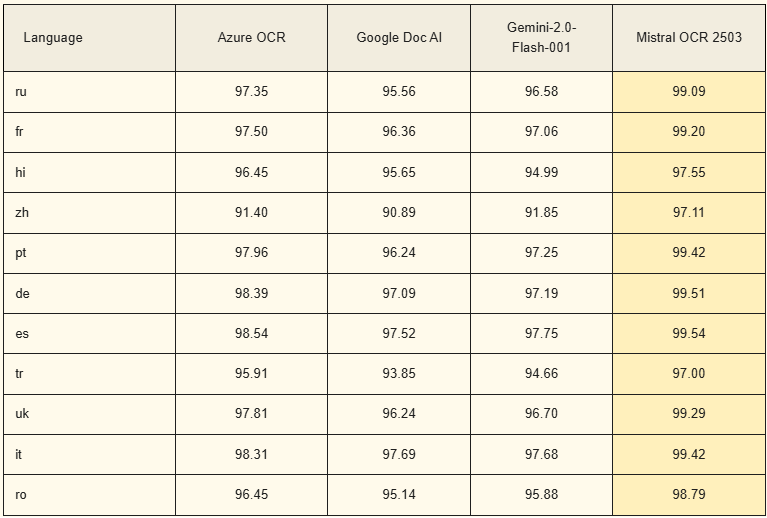
It’s worth mentioning that, according to published benchmarks, Mistral OCR showed extremely high accuracy rates (97%-99%+) across multiple languages, beating the best-known OCR services so far. For example, in comparative internal tests, it reached 99.42% accuracy in Portuguese and 99.54% in Spanish, higher than the figures obtained by Azure’s OCR and the Google Vision API in those languages.
There’s no specific parameter to indicate the language in the ocr.process call, since detection is automatic. The model will analyze the text and recognize the language from the content. For example, if you provide a tax invoice in Portuguese, the accented characters and Portuguese terms will be correctly kept in the output. If you then process a document in English or French, the output will reflect those languages, even keeping special characters (like ç, ñ, umlauts, etc. when present).
In the case of documents with multiple languages on the same page (for example, a bilingual contract or an invoice with sections in English and Spanish), Mistral’s OCR should capture both parts. A useful tip is, after getting the result, to use some language detection library on the extracted text to classify the predominant language or split it by language if needed.
In most cases, you just call the OCR as usual and it figures out any language on its own. This simple setup speeds up development a lot, since you don’t need a specific OCR model for each language.
4. Privacy and masking of personal information (PII)
When extracting data from customer documents, we often run into sensitive information, like people’s names, addresses, ID numbers (SSN, driver’s license, passport), financial or health data. This data, known as PII (Personally Identifiable Information), requires extra care when we’re going to use language models or cloud services, because of privacy concerns and legal compliance (LGPD, GDPR, etc.). In this section, we go over best practices for protecting PII when using Mistral OCR and when sending data to LLMs.
Any data sent to an external AI service can potentially be stored or inadvertently exposed. Even though Mistral OCR itself only extracts text, the next step in many applications is to send that text to an LLM (for example, to summarize a contract or extract insights). If we do that directly with raw data, we may be sharing personally identifiable information with a third party. To mitigate the risks, it’s recommended to anonymize or mask this sensitive data before sending it to an LLM.
Masking techniques:
- Redaction (masking): Replace sensitive parts with placeholders or generic characters. E.g.: turning “John Smith” into “CUSTOMER_1”, “123 ABC Street” into “ADDRESS_X”. That way, the LLM works on altered data, without identifying the real person
- Pseudonymization: Similar to masking, you can generate fictitious identifiers (e.g.: swapping names for other generic names or codes) so that the data loses its direct link to the original identity, but still makes structural sense.
- Removing unnecessary data: Often, you don’t need to send all of the text to the LLM. Send only the fields relevant to the task. For example, if you want the LLM to categorize the type of document, you may not need the personal data it contains, which can be removed from the prompt.
- On-premise or self-hosted LLM: Instead of using a public LLM (external API), your company can use a local model or an on-premise instance. Open source models like Gemma, LLaMa, DeepSeek, and Qwen can be great picks for this.
Practical masking example: Suppose that after running Mistral OCR on a contract, we got a text that includes: “Name: Mary Johnson; SSN: 123-45-6789; Address: 1000 Main Street, Springfield.” (that is, name, SSN, and address). Before sending this to an LLM (for example, to summarize the contract), we can do:
ocr_text = ocr_response.pages[0].markdown

# simple mask for the SSN pattern (replaces the digits with a placeholder)
import re
masked_text = re.sub(r'\d{3}-\d{2}-\d{4}', '[SSN_MASKED]', ocr_text)
masked_text = re.sub(r'Name:\s+[A-Za-z ]+', 'Name: [NAME]', masked_text)
masked_text = re.sub(r'Address:\s+.*', 'Address: [ADDRESS]', masked_text)

print(masked_text)
After these substitutions (simple, just illustrative), the text to be sent to the LLM would look like this: “Name: [NAME]; SSN: [SSN_MASKED]; Address: [ADDRESS].” The content stays useful for many tasks (for example, extracting what the contract is, dates, amounts, etc.), but the personal details have been protected. The masking strategy should be adapted to the type of document and data, and the important thing is to make sure no sensitive information is sent in clear text for external processing. This reflects a responsible AI approach, keeping the customer’s privacy first.
Final thoughts on privacy: Always review the policies of the LLM provider you use. Even if you mask data, it’s good to understand how the provider handles the prompts you send. In many cases, a combination of masking + a confidentiality agreement with the provider + additional security measures will make for safe, compliant use of AI tools.
Conclusion
In this tutorial, I explored how Mistral OCR can automate data extraction from customer documents, highlighting its features for recognizing fields in structured documents (like invoices), reading handwritten text, robust support for multiple languages, and recommended privacy practices.
Mistral OCR presents itself as a state-of-the-art OCR solution, combining high accuracy with flexibility for many kinds of documents. By applying the best practices discussed, especially when it comes to handling sensitive data, you can take advantage of the full potential of this technology in a professional and responsible way.
I hope this guide has given you a clear path to start extracting and structuring valuable information from your customers’ documents using Mistral OCR.
Happy experimenting and building!