Adobe Photoshop and Acrobat for free in ChatGPT
Published on
One of the most surprising pieces of news in the latest news episode of IA Sob Controle was the announcement of Adobe’s partnership with OpenAI, and the integration of its products into ChatGPT.
This is one more strong move for agentic AI, where the model doesn’t just generate text or images from scratch, but knows how to use existing tools to get tasks done.
Anyway, which products are in on this?
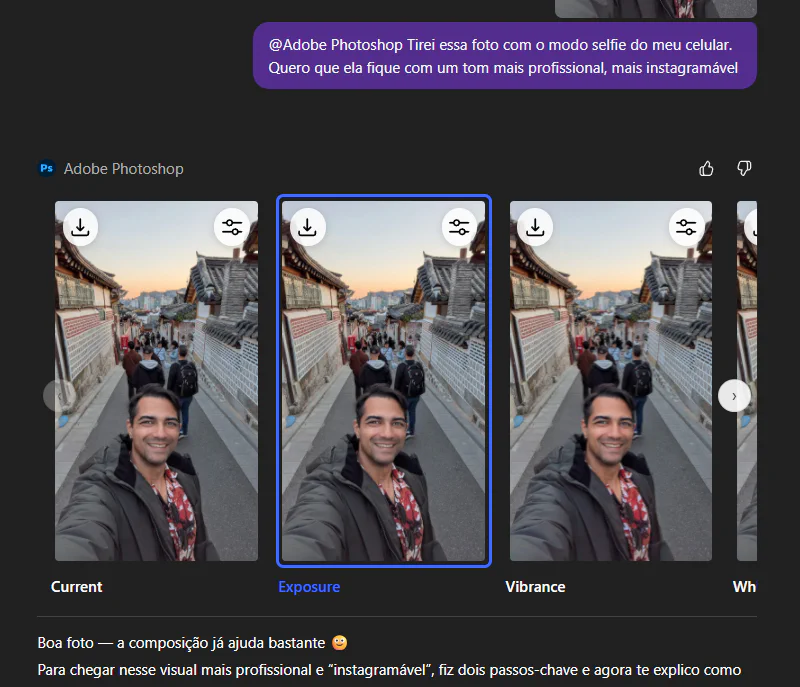
- Photo editing with Adobe Photoshop: YES. Believe it or not, you can now basically use Photoshop through text (or voice) prompts. You upload a photo and ask for things like “remove the background”, “improve the lighting” or “apply a blur”. And the coolest part is that it uses the real Photoshop engine, so the quality is the same (you even get a few sliders on screen to control the intensity of the effects manually and so on).
- PDF editing with Adobe Acrobat (Glory! Hallelujah, brothers and sisters! 🙌): Anyone who works with documents, or has even had to do it once, knows what a NIGHTMARE it is to edit a PDF file. With this Acrobat integration, you can ask ChatGPT to “merge these two files”, “delete page 3” or even “extract the table on page 10 and give it to me in Excel”. All just by chatting. I confess this one hit me HARD.
It’s worth mentioning a technical detail I found interesting: this integration uses the MCP (Model Context Protocol) standard, proposed by Anthropic, to manage the connection between the models and the tools.
At the end of the day, it’s the same logic Google and Microsoft have been adopting, but seeing Adobe (which is SUPER protective of its software) jumping in headfirst shows that the game has really changed.
And the best part, these basic features will be available on ChatGPT’s free plan, and don’t require any extra Creative Cloud subscription (that fact also caught me by SURPRISE).
On both the OpenAI and the Adobe side, you can see this as a direct response to the advance of Google Gemini with Nano Banana Pro and the gigantic growth of Canva and similar tools.
On the designers’ side, it’s one more piece of news that can be a great tool for those who know how to use it well as part of their arsenal, but it can clearly fuel even more of a gutting of the career.
As for me, not being a professional, I already know I’m going to have to open my Photoshop a lot less often. And I solemnly swear that I will never again in my life open the “Edit” option in Adobe Acrobat.